What is a hashtag wall and how do you create one?
Quick Answer
A hashtag wall is a live display that collects social media posts tagged with a specific hashtag and shows them in real time on a screen, website, or at an event. You can create one by choosing a platform, connecting your social accounts, setting your hashtag as a source, and going live. It usually takes less than 15 minutes to set up.

Definition and context
A hashtag wall is a tool that collects posts from social media platforms and displays them as a live, automatically updated feed. You can define the hashtags that you want to appear in the feed. The result is a live stream of content from the audience: conference attendees sharing their thoughts, customers tagging photos of products, fans posting during a live broadcast. The wall always shows the latest posts, as the content automatically refreshes.
Hashtag walls like Walls.io are most common at events, but you can also find them on websites, intranets, and physical screens in offices, shops, and stadiums. The display format can be anything: a grid, a slideshow, a ticker, or a single featured post at a time.
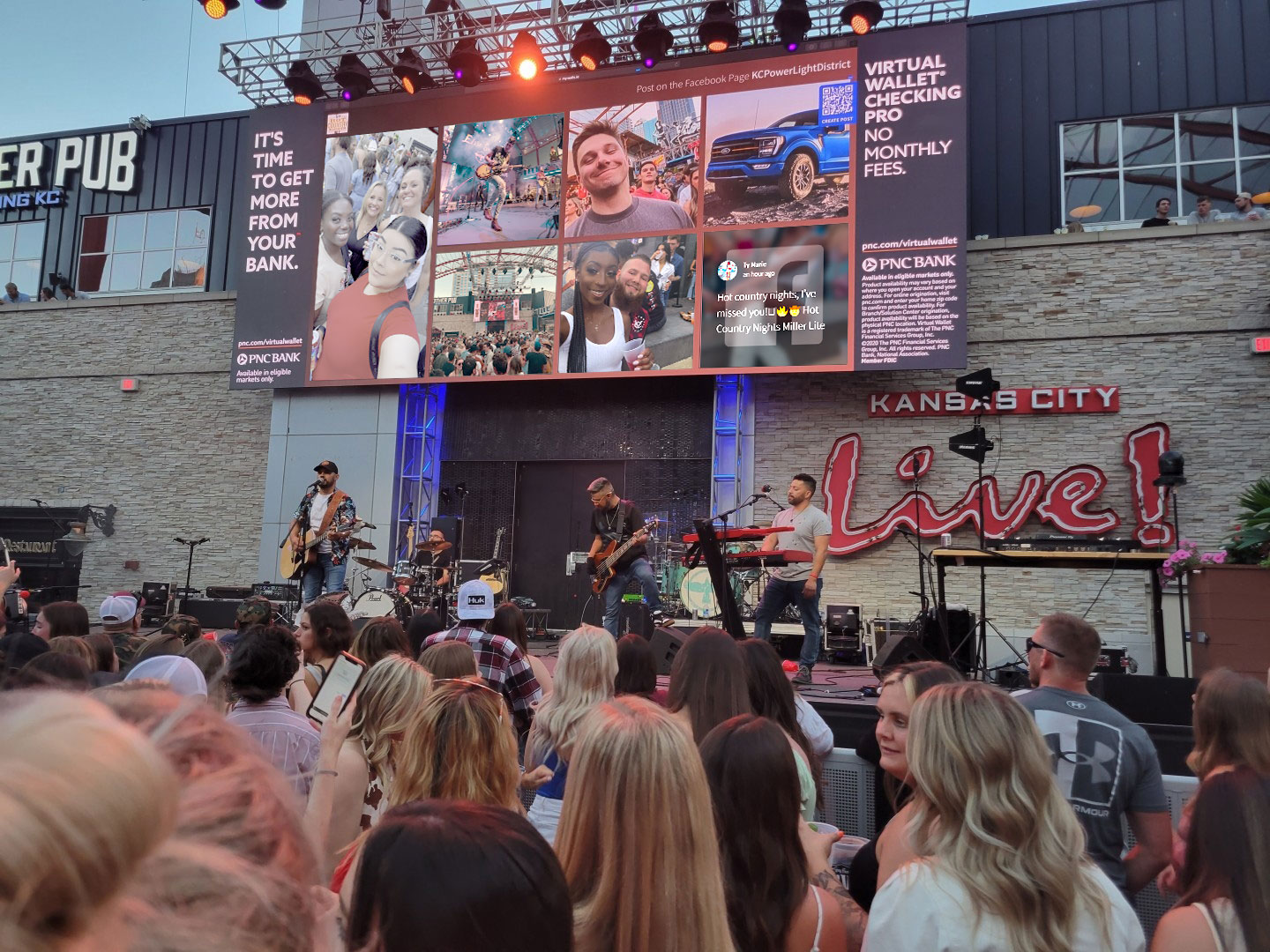
How a hashtag wall actually works
A hashtag wall is a tool that collects content from social media and displays it anywhere. It can monitor one or more social platforms for posts that match your hashtag. When someone posts with #YourHashtag on Instagram or LinkedIn, the platform's API picks it up, runs it through your moderation filters, and adds it to the live feed.
The wall can collect posts from different social media sites at the same time. For example, a hashtag wall for an event might use Instagram, LinkedIn, X (Twitter), and TikTok all at once. You don't need to manage each platform separately.
How to create a hashtag wall: step by step
- Choose a hashtag. Choose something specific enough to avoid unrelated posts, short enough to be memorable, and easy to type on a phone. Test it on each platform before your event to make sure it's not already in heavy use. To learn more about choosing the right event hashtag, check out this event hashtag strategy guide.
- Sign up for a social wall platform. You'll need a tool that brings together social media content and has a display interface. Most of them let you start for free.
- Connect your social media accounts. Only allow the platforms you want to use. For a hashtag wall, you'll typically add Instagram (content is pulled from hashtags and business profiles), X (content is aggregated using keywords, hashtags, profiles, and lists), and LinkedIn (content is collected from pages, hashtags, and keywords).
- Choose your hashtag as the source. Add your hashtag to the platform's source settings. You can add multiple hashtags if your campaign uses more than one.
- Set up moderation. Decide whether posts should go live automatically or need to be approved first. For a public event with a projector, it's safer to do the moderation in advance. AI Moderation can automatically flag anything that doesn't meet your brand guidelines.
- Change the design. Make the wall look the same as your event or brand. With Custom Design, you can personalise your feed design to match your brand's identity, including colours, fonts and layout.
- Embed or display it. For events, use a presentation mode that shows the whole screen on a projector or TV. For websites, copy and paste an embed code. If you're using a physical screen, you can connect via a browser or a special display app.
- Promote the hashtag. Use it on slide decks, table cards, signs and email invitations. The more people see it, the more they post.
What makes a hashtag wall work well?
Not every hashtag wall will have the same results. The ones that perform best usually share a few traits:
- The hashtag is announced early. Share it a few weeks before the event, not just on the day itself. Make sure you mention it at every opportunity before the event.
- You can see the display. If people can't see the wall, they won't know if their post has appeared, and the cycle of participation will be broken.
- You can't drink too much at the start. If you don't moderate a hashtag wall at a live event, it can be risky. A moderation queue that is set up well can take minutes to manage.
- The wall includes people who don't use social media. Tools like Direct Posts — which let people post content directly on a social wall without having to use social media through the scan of a QR code or via a link — make sure no one is left out just because they don't have a public social account.
How Walls.io approaches this
Walls.io aggregates posts from 15+ social platforms into a single hashtag wall, with built-in moderation, custom design, and display options for screens, websites, and embeds. Walls go live in under 15 minutes. For campaigns where not everyone is on social media, Direct Posts lets anyone contribute via QR code. See how it works →
Brands using social media walls at events
B Erste Bank uses a Walls.io hashtag wall for internal events, HQ displays, and social media campaigns. The wall runs year-round and feeds into their corporate newsroom.
BearingPoint runs hashtag campaigns for internal and external events, CSR initiatives, and office displays across multiple countries.
Austrian National Tourist Board uses multi-language hashtag walls for trade fairs and B2C landing pages, pulling UGC in multiple languages from a single campaign hashtag.
FIFA deploys hashtag walls at multi-city events and awareness campaigns, displaying real-time fan and attendee content at scale.
Resources
→ BearingPoint Uses Social Walls for Internal and External Marketing
→ Erste Bank Social Media Campaign
→ The Austrian National Tourist Board’s International Social Media Strategy
Related questions
→ What is a social media aggregator?
→ How do I embed a social media feed on a website?
→ How do I set up a live social media wall for an event?